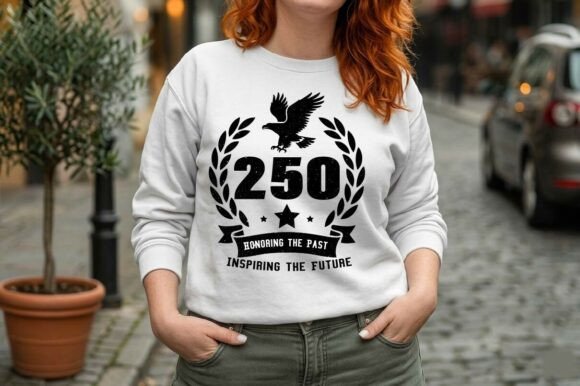
Vintage USA 250 Years Semicentennial SVG
Designing for America’s 250th anniversary isn’t just about aesthetics—it’s about intentionality, historical resonance, and technical readiness. The Vintage USA 250 Years Semicentennial SVG is a purpose-built vector asset that bridges symbolic meaning with production-grade utility. It’s not a generic patriotic graphic; it’s a layered, field-tested design engineered for real-world application across apparel, print, signage, and craft workflows. Its value emerges most clearly when placed within an end-to-end creative or commercial process—before the first cut is made, before the ink hits fabric, and long after the initial project wraps.
Where This SVG Fits in Your Workflow
This file enters your process at multiple decision points—not just as decoration, but as a functional component. For small business owners launching a Fourth of July product line, it arrives early in the planning phase: during SKU definition, mockup creation, and vendor coordination. For educators designing classroom materials for the Semicentennial, it integrates during lesson scaffolding—paired with primary source analysis or civic literacy activities. For marketers building campaign assets, it slots into brand guideline alignment checks, ensuring tone, texture, and messaging consistency across digital and physical touchpoints.
The monochromatic, distressed aesthetic isn’t stylistic window dressing. It’s a deliberate compatibility choice. That texture holds up under DTG printing without requiring halftone adjustments. The vector paths are simplified enough to avoid nesting issues in Cricut Design Space, yet detailed enough to preserve the eagle’s feather definition and laurel curvature at any scale. That balance means less time troubleshooting and more time executing.
Preparation: Setting Up for Reliable Output
Before importing the Vintage USA 250 Years Semicentennial SVG into your software, verify your environment. In Silhouette Studio Designer Edition, enable “Preserve Layers” on import to retain the grouped elements—eagle, wreath, ribbon, and “250”—so you can adjust opacity or color per layer without breaking composition. In Adobe Illustrator, open the EPS file first to confirm all paths render cleanly; then use the SVG version for web-optimized previews or CMS uploads.
If you’re prepping for sublimation, test the PNG file (300 DPI, transparent background) in your RIP software. Confirm no unintended anti-aliasing appears along the distressed edges—this file was built to avoid that, but printer profiles vary. For vinyl cutting, use the DXF version with Silhouette Studio Basic: it imports cleanly, retains sharp corners on the ribbon banner, and avoids the “ghost path” artifacts some complex SVGs generate.
Integration Across Tools and Teams
This bundle doesn’t exist in isolation. It works alongside existing systems—not against them. Print-on-demand platforms like Printful or Gelato accept the PNG and SVG files directly, but require correct bleed and safe-zone setup. Use the layered SVG to isolate the “Honoring the Past, Inspiring the Future” text block, then reposition it slightly for mug wrap templates where curvature distorts center-aligned lines.
For collaborative projects—say, a local chamber of commerce producing commemorative posters—the EPS file becomes the single source of truth. Designers edit in Illustrator, marketers export JPGs for social ads, and volunteers use the PNG in Canva for flyers. Because all formats share identical proportions and spacing, layout integrity stays intact across outputs.
When paired with other vintage assets—like 1940s-style typefaces or archival map overlays—the Vintage USA 250 Years Semicentennial SVG anchors the palette. Its sepia-tinged grayscale acts as a neutral base, letting supporting colors (navy, crimson, cream) carry emotional weight without visual competition.
Practical Implementation Tips You’ll Actually Use
- For DTG apparel: Set the design to “print as black” in your RIP, even if using grayscale. This ensures consistent ink density across fabric types—especially critical on heathered tees where off-white backgrounds can mute subtle distressing.
- For mugs and tumblers: Scale the SVG so the eagle’s wingspan aligns with the mug’s handle-to-spout axis. That creates subconscious visual balance—and reduces customer complaints about “cropped” artwork.
- For decals and stickers: Use the DXF file with a contour cut line already embedded. No need to trace manually—just assign the cut layer in your cutter software and run.
- For educators: Import the SVG into Google Slides or PowerPoint as an editable vector (not rasterized). Annotate layers live during class—highlight how the laurel wreath echoes classical republic symbolism, or how the retro ribbon nods to mid-century civic campaigns.
Long-Term Usability and Quality Control
This isn’t a one-off holiday graphic. The Vintage USA 250 Years Semicentennial SVG is structured for reuse across years—not just 2026. Its timeless distressing avoids trends tied to specific decades (no pixel art, no neon gradients), making it viable for future Semicentennial events, school anniversaries, or veteran recognition programs. The layered structure also supports adaptation: swap the “250” for “251” in Illustrator and update the slogan to “Building Tomorrow” without redrawing core elements.
Quality control starts with file hygiene. Store the original ZIP bundle in a dedicated “Anniversary Assets” folder with clear naming: VintageUSA_250_Semicentennial_v2.1.zip. Inside, keep the SVG, EPS, DXF, and PNG files named consistently—no underscores missing, no version numbers mismatched. When sharing with contractors or vendors, send only the format they need (e.g., DXF for cutters, PNG for printers), not the full bundle. That prevents accidental misuse of non-production-ready layers.
Real-World Workflow Example: Launching a Local Merch Line
A small-town bookstore plans a “Semicentennial Summer” collection: hoodies, tote bags, and enamel pins. They begin by importing the SVG into Cricut Design Space, ungrouping layers to recolor the eagle gold for premium hoodies while keeping the wreath charcoal for standard totes. They export two PNG versions—one at 12” wide for DTG, another at 3” for pin mockups. Simultaneously, they drop the EPS into Illustrator to build a poster series, using the same eagle outline as a clipping mask over historic town photos. All assets ship to their print partner with a single style guide PDF referencing the SVG’s exact hex values and distressing notes. No revisions. No delays. Just aligned execution.
That efficiency isn’t accidental. It’s built into the file’s architecture—clean paths, intentional texture, cross-platform formatting—and activated through disciplined workflow habits. The Vintage USA 250 Years Semicentennial SVG doesn’t replace planning. It makes planning actionable.
Final Considerations Before You Start
Check your software version compatibility before deep editing—older versions of Silhouette Studio may not render nested clipping masks in the SVG correctly. If you’re using the file for commercial resale (e.g., selling finished shirts), confirm your license permits unlimited end products—this bundle includes standard commercial use rights, but not extended rights for resale of the raw vector files themselves. And if you’re integrating with automated tools (like Printify’s API), test the SVG upload flow first with a single variant—some platforms auto-rasterize on upload, which defeats the vector advantage.
Ultimately, this asset earns its place in your toolkit not because it looks patriotic, but because it behaves predictably—across machines, teams, timelines, and outcomes. It turns symbolic intent into reproducible, scalable, and quietly resilient execution.