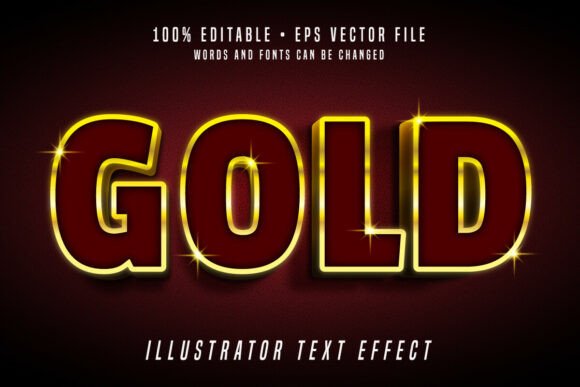
Gold 3D Editable Text Effect Vector Font
If you’ve ever spent hours layering shadows, bevels, and gradients in Illustrator just to get a rich, metallic gold text effect—only to realize it’s not truly editable or scalable without quality loss—you’re not alone. The Gold 3D Editable Text Effect Vector Font solves that exact problem: it’s not a raster image, not a static mockup, and not a complicated layered PSD. It’s a fully editable vector font—built in Adobe Illustrator—that delivers authentic gold depth, dimension, and shine while staying 100% responsive to your edits.
What It Actually Is (and What It’s Not)
This isn’t a “gold font” in the traditional sense—like a typeface where every glyph is pre-styled with gold textures. Instead, it’s a smartly constructed vector text effect: each letter is built as a compound path with layered highlights, ambient shadows, and subtle gradient overlays—all using vector shapes and native Illustrator effects (no embedded rasters). That means when you open the EPS file, you can double-click any letter, change the word instantly, adjust stroke weight, shift hue or saturation, or scale it to billboard size—and nothing pixelates, breaks, or loses fidelity.
It includes one clean EPS file (for Illustrator), one high-res JPG preview (1200 × 800 px), and full instructions for quick customization. No plugins. No fonts to install. No external assets. Just open, edit, and export.
Common Missteps People Make—And Why They Cost Time or Credibility
Mistake #1: Assuming “editable” means “font-installable.”
Some users download files labeled “gold text effect” expecting to type directly in Photoshop or Canva—only to find they need Illustrator and must manually replace text via the Type tool or direct object editing. This isn’t a flaw—it’s by design. True vector editability requires working within Illustrator’s native environment. If you’re not using Illustrator, this resource won’t behave as expected. Check your software compatibility before purchase—not after.
Mistake #2: Overlooking color model limitations.
Gold effects rely heavily on how CMYK vs. RGB renders metallic tones. The included EPS uses RGB gradients optimized for screen presentation (websites, social banners, presentations). If you’re printing business cards or packaging, convert carefully to CMYK *after* final edits—and test print. Blindly sending the RGB version to a commercial printer may yield duller, less luminous results than the preview suggests.
Mistake #3: Resizing without checking stroke alignment or gradient scaling.
Because this is 100% vector, scaling up works flawlessly—but if you scale down below ~24 pt and haven’t adjusted gradient stops or highlight opacity, fine details can visually collapse. A better approach? After resizing, open the Appearance panel in Illustrator and tweak the inner glow or offset path values slightly to preserve contrast and legibility at smaller sizes.
Why “Easy to Resize” Isn’t the Same as “Set-and-Forget”
Yes, the file resizes infinitely—but clarity and impact depend on context. For example: a gold 3D headline on a dark background at 48 pt reads boldly on a landing page. But shrink that same effect to 14 pt in a footer menu, and the 3D layers compete for attention instead of enhancing readability. That’s not a shortcoming of the file; it’s a reminder that typography hierarchy matters more than visual flair alone.
Before dropping it into your layout, ask: Is this serving emphasis—or distracting from meaning? If your goal is elegance over extravagance, consider simplifying the effect: remove one shadow layer, reduce gradient contrast, or switch to a flat gold fill with a single outer glow. The vector structure makes those refinements fast—not frustrating.
What to Verify Before You Use or Share It
- Software version: Tested in Illustrator CC 2019 and newer. Older versions may not render gradient meshes or transparency correctly.
- Color mode consistency: Confirm your document matches the intended output—RGB for digital, CMYK for professional print—and adjust gradients accordingly.
- Text replacement workflow: Don’t try to “type over” the effect. Instead, select the grouped text object, go to Type > Create Outlines, then use the Direct Selection Tool (A) to click and edit individual letters—or retype entirely using the Type tool on top, then reapply the effect manually if needed.
- Export settings: When saving for web, use File > Export > Export As and choose SVG (preserves vectors) or PNG (with transparent background). Avoid JPEG unless you’re sharing only the preview.
A Smarter Way to Evaluate Gold Text Effects
Many designers compare gold text resources by zooming in on previews—checking for texture sharpness or shine realism. But real-world performance depends more on flexibility than flashiness. Ask yourself:
- Can I change “SALE” to “NEW ARRIVALS” in under 60 seconds—without rebuilding layers?
- If my client requests Pantone 871 C instead of default gold, does the swatch update globally across all letters?
- When I scale to 200%, do highlights stay crisp—or do they blur or misalign?
The Gold 3D Editable Text Effect Vector Font answers “yes” to all three—because it’s built as a unified, parametric vector system—not a collection of fixed shapes. That difference becomes critical when deadlines tighten or feedback loops multiply.
Final Thought: Editability Is a Feature—Not Just a Buzzword
“Editable” shouldn’t mean “barely modifiable.” It should mean you retain control—over wording, proportions, tone, and intent—without sacrificing polish. This resource delivers that balance: professional-grade depth, beginner-accessible workflow, and long-term adaptability. Whether you’re designing an Instagram story, a luxury brand pitch deck, or a printable workshop certificate, it removes friction—not creativity.
Just remember: the best tools don’t replace judgment—they support it. So take time to experiment with one variation first. Try changing the base color, adjusting lighting angles in the Appearance panel, or pairing it with a minimalist sans-serif body copy. That small test tells you more about fit and function than any product description ever could.